
With Metacoda Plug-ins you can easy view and explore every aspect of the metadata in your SAS implementation.
Metacoda is the trusted SAS companion, eliminating manual, cumbersome tasks and improving the security, risk management and governance of your SAS installation.
+ Gain Visibility
Metacoda provides comprehensive visibility of your SAS metadata security implementation, and robust analysis and auditing capabilities.
With Metacoda, you can retrieve and examine the complete identity or object hierarchy in seconds and quickly perform effective permissions analysis across all information assets.
+ Increase Productivity
By reducing the number of clicks it takes to get your answer, Metacoda Plug-ins save you time and allow several perspectives of analysis in rapid succession.
Retrieve and examine your SAS environment’s complete identity hierarchy and object hierarchy in seconds and quickly generate metadata security reports, without the need to write and maintain custom code.
+ Improve Security
Gain the insight required for security management and auditing.
Every major aspect of your SAS metadata security can be analysed and audited, providing high confidence in your security model.
With notifications of potential problems and alerts to draw your attention to changes within your SAS metadata security model, you can relax, knowing your SAS metadata environment is secured the way you want.
+ Mitigate Risk
With Metacoda you can easily implement and maintain metadata security best practices across your SAS environment.
- Metacoda Plug-ins help you:
- Continually monitor and test that your SAS environment is secured the way you expect
- Automatically synchronize user identities from Active Directory to SAS;
- View out of the box audit reports for Metacoda-driven identity management changes;
- Identify potential access control issues and deviations from best practices in SAS metadata security;
- and so much more.
+ Reduce Cost
This time savings and out-of-the box features provided by Metacoda significantly reduces the cost of managing, auditing and testing of your SAS installation.
Metacoda Plug-in Features
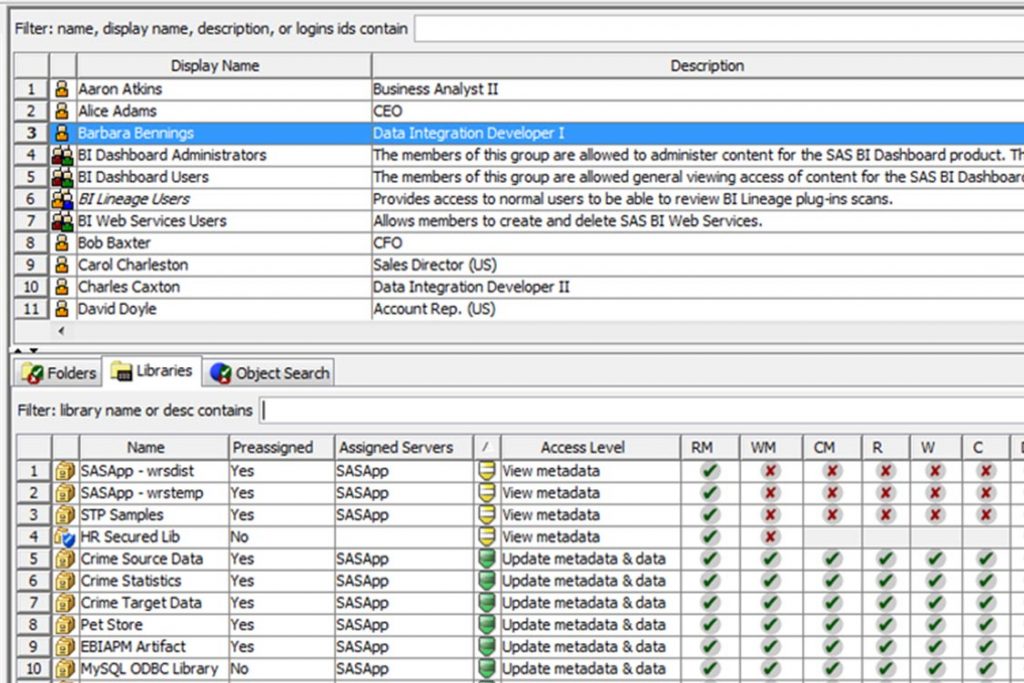
Identity Permissions Explorer
The Identity Permissions Explorer provides you with comprehensive, whole-of-server views of effective permissions for a specific user or group across multiple objects.
Find a single identity (user or group) and review its effective permissions across multiple objects such as folders, libraries, stored processes, reports, etc.
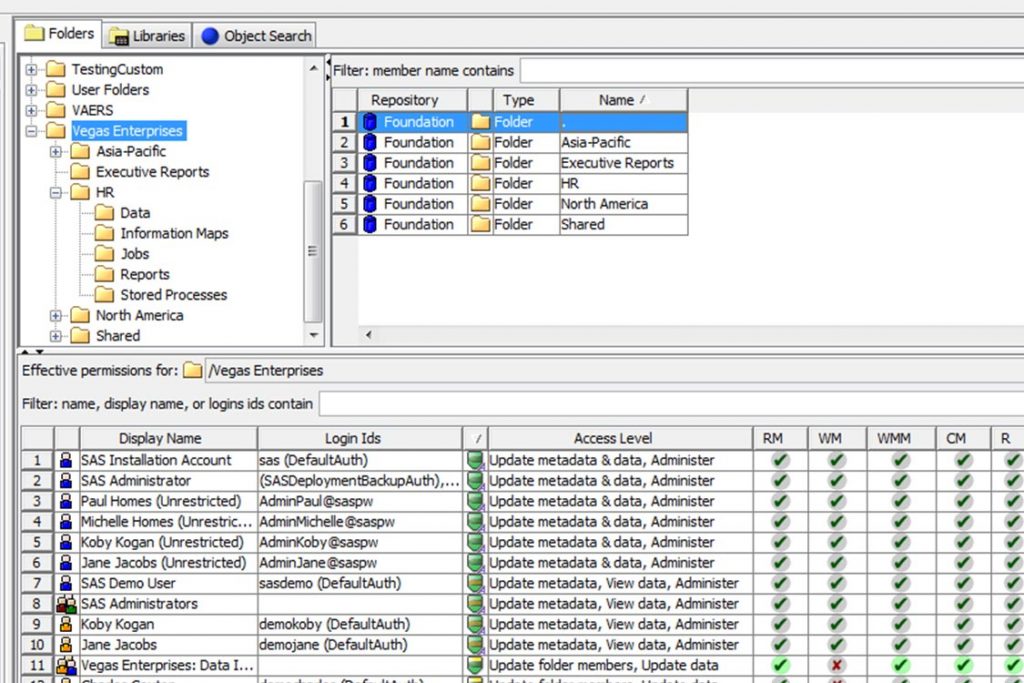
Object Permissions Explorer
The Object Permissions Explorer provides you with comprehensive, whole-of-server views of effective permissions, for multiple identities, on a specific object within your SAS metadata security implementation.
Browse or search for a single object such as a folder, library, stored process, report, or other object, and review the effective permissions on that object across multiple identities (users or groups).

ACT Reviewer
Review the use of Access Control Templates (ACTs) – how they have been defined, where they have been applied, and how they have been protected.

ACE Reviewer
Review the use of Access Control Entries (ACEs) – the objects they have been applied to and the permissions they impart.

User Reviewer
Review users that have been defined in SAS metadata including their group memberships, role memberships, the capabilities they have access to, accessible logins, and more.

Group Reviewer
Review user groups that have been defined in SAS metadata including their members, group memberships, role memberships, the capabilities they provide to their members, and more.

Role Reviewer
Review roles that have been defined in SAS metadata including their members, roles that they contribute capabilities to, roles they receive capability contributions from, and more.

Capability Reviewer
Review capabilities in SAS metadata – the roles that provide those capabilities and the members they provide those capabilities to, including all of the multiple membership and contribution paths.

Protected Object Reviewer
Review SAS metadata objects that have been explicitly protected through the use of ACTs or ACEs.

Login Reviewer
Review any logins stored in metadata that are accessible to the current user.

Permissions Tracer
Easily discover the source of effective permissions on an object for a user or group.

Testing Framework
Protect the integrity of your current SAS metadata security implementation using tests and alerts (available in our Enterprise level license package).

Identity Sync
Import, check and synchronize identity-related SAS metadata with enterprise directories without the need to edit SAS code.

Internal Login Reviewer
Review any internal logins stored in metadata that are accessible to the current user.

Auth Domain Reviewer
Review authentication domain information such as if it is in use, logins, connections and libraries.

External Identity Manager
Provides facilities to view, add, edit, delete, import, export and report on external identity metadata.

Using Metacoda Plug-ins gives us confidence that the enterprise data warehouse is secured to the standards set and expected and enables us to quickly and easily audit our security at any time. Once you’ve used Metacoda Plug-ins you will never go back. It’s a must–have for every SAS® administrator!
Tammy de Zilva
Auto & General Insurance
Enterprise Data Warehouse Technical Lead and SAS® Administrator
Want to keep your SAS® platform secure? Try Metacoda Plug-ins today to get the metadata visibility you need.
Register for our free 30-day trial or enquire for more information.